Page 1 of 1
4K Monitor Issues and High DPI Scaling Settings (SOLVED)
Posted: Tue Jul 05, 2016 11:04 pm
by Marcush
So far I have been unable to get this to work with my 4K monitor, it looks like it drags the mouse off of the tiny 1024x768 game screen and tries to click on my desktop to undock (which it unsuccessfully does).
Re: 4k Monitor issues
Posted: Fri Jul 08, 2016 3:37 am
by VanGoghGaming
What operating system are you using? Have you enlarged the size of text and other items in your control panel Display settings? You need to put them back at the default value!
Re: 4k Monitor issues
Posted: Mon Jul 11, 2016 7:02 pm
by Marcush
I was able to switch to 1920x1080 and it works fine, but no setting in 4K will get it to work.
I'll assume that you don't have a 4K monitor to test with?
Re: 4k Monitor issues
Posted: Tue Jul 12, 2016 2:29 am
by VanGoghGaming
No, I don't have a 4K monitor to test (I got two 1080p ones

) but it shouldn't make a difference at all when compared to other resolutions. I was referring to the size of text, apps and other items which should remain at 100% (Recommended) as shown in the screenshot below:
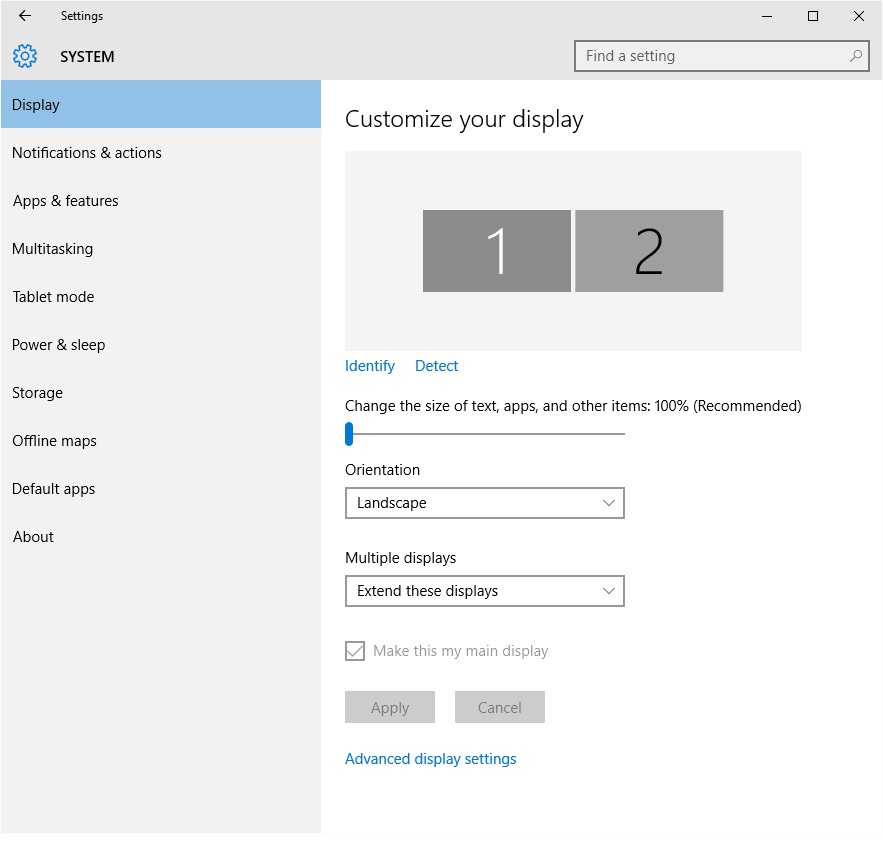
- Size of text, apps and other items at 100% (Recommended).
- DisplaySettings.jpg (70.87 KiB) Viewed 40239 times
Don't forget to reboot your computer after making this change even if you are not prompted to do so!
UPDATE: If you wish to keep your higher scaling for your text and other items (so that they are easier to read) then you need to edit the "Eve Online - High DPI Scaling Settings" as described in the screenshot from the post below:
Re: 4k Monitor issues
Posted: Thu Jul 14, 2016 12:58 am
by Marcush
It works in 4K with 100% set, but damn is everything too tiny to read

Re: 4K Monitor Issues and High DPI Scaling Settings (SOLVED)
Posted: Tue Apr 23, 2019 3:31 pm
by VanGoghGaming
Now you can keep your larger size for text and other items so that you can comfortably read and browse the web on your 4K Monitor or TV while TinyMiner continues to mine like a champ and fatten your ISK wallet! To do that you need to edit the properties for Eve Online performing the steps outlined below:
- right-click on EVE from your taskbar
- right-click "CCP ExeFile" from the context menu
- select "Properties" to open the properties sheet
- select the "Compatibility" tab
- click on "Change high DPI settings"
- select "Override high DPI scaling behavior. Scaling performed by: Application"
- click OK to confirm your settings
- restart Eve Online
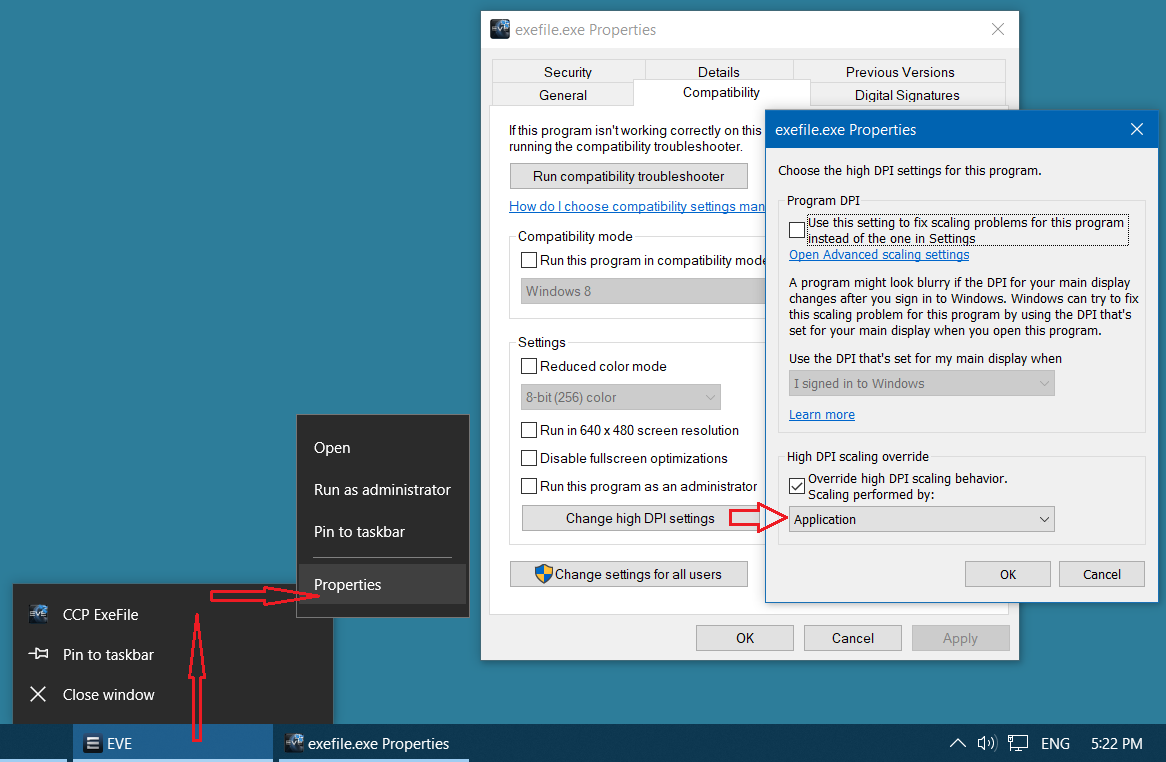
- High DPI Scaling Override Settings for Eve Online
- Eve Online High DPI Settings.png (75.1 KiB) Viewed 37239 times
Now the Eve Online window should no longer start artificially enlarged with blurry text and graphics!